v1.47.0 (239) GPL-3.0 Open Source

Every Android app update. One privacy-first hub.

ApkUp discovers, verifies, and autonomously installs app updates across Google Play, F-Droid Index V2, IzzyOnDroid, APKMirror, GitHub, GitLab, and Codeberg — with zero ads, zero tracking, and silent Shizuku or Root background installs.

Download ApkUp (v1.47.0)

Android 10.0 – 17 (API 29+) • Verified SHA-256 • 9 Languages

How to install unknown APKs & unlock Google’s 24h lock?
Quick Install Guide (Android 10–17)
  1. Tap the downloaded APK and enable “Allow from this source”.
  2. New 24h Play Protect Lock (2026/27): Developer Options (7× Build No.) → Apps from unverified developers → Restart → After 24h pick Allow indefinitely.
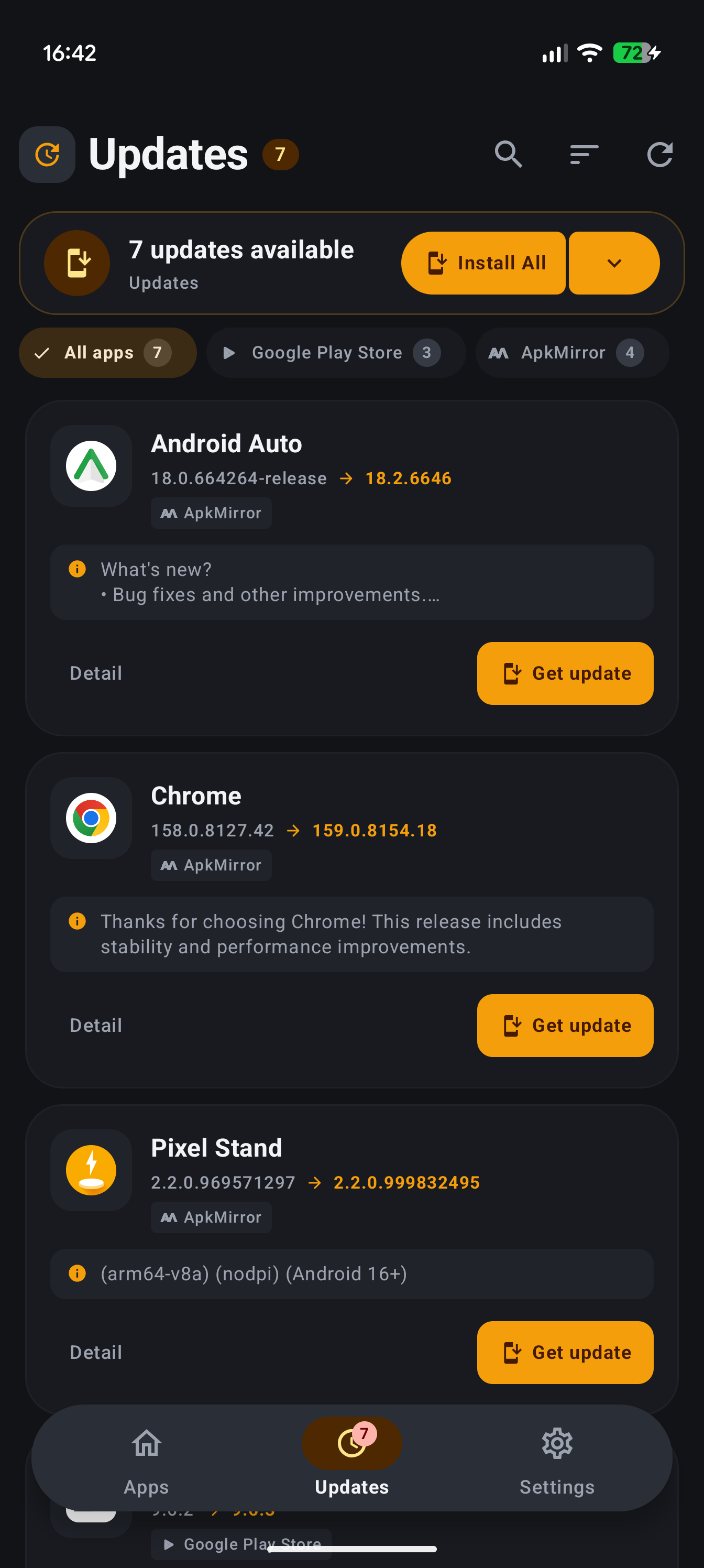
ApkUp Updates screen showing available app updates and batch install button
100% Zero Ads & Zero Telemetry
7+ Independent Update Sources
v2 / v3 APK Signature Verification
AES-256 Google Tink Local Keystore

Built for effortless updates and cryptographic trust

Clean Material 3 Expressive usability on the surface, backed by verifiable security checks and power-user control underneath.

7+ Sources

Multi-Source Discovery with Priority & Pinning

Check updates across Google Play, APKMirror (.apkm + Cloudflare fallback), F-Droid Index V2 with RFC 7396 diffs, IzzyOnDroid, GitHub, GitLab (including nested subgroups), and Codeberg / self-hosted Forgejo. Drag-and-drop source priority and pin individual apps to your preferred repository.


Shizuku / su

Silent Background Installs

Zero-touch background installations via Shizuku (no Root required) or optional Root (su), guarded by Wi-Fi-only, charging-only, and active time window rules.

apksig v2/v3

Defense-in-Depth Verification

Verifies APK signing certificates against the installed app, validates SHA-256 digests, checks minSdk / ABI compatibility, blocks downgrades, and encrypts tokens via Google Tink AES-256-GCM.

JSON Sync

Obtainium & App Watcher Migration

Import app configs, custom F-Droid repos, and watchlists from Obtainium with an interactive preview sheet, or export your custom ApkUp bindings back to Obtainium JSON.

Rollback + SAF

Rollback Backups, Watchlist & Save APK

Track uninstalled apps, back up existing APKs (including splits) before updating, keep verified downloads in a 24h smart cache, and export .apk or .apks bundles to any SAF folder.

M3 Expressive

Material 3 Expressive, Pre-Release Channels & Self-Updater

Brand Amber & Off-White themes, optional Dynamic Color (Material You), adaptive tablet navigation rail, configurable Beta/RC/Alpha/Nightly channels per app, and a verified SHA256SUMS self-updater with opt-in Beta builds.

Designed for thumb-zone ergonomics

Explore the real app interface — switch between screens below or tap the phone preview to zoom in.

One tap to update, or batch-select on long press

See version deltas, release notes, source pills, and live overall WorkManager ETA progress in one calm Material 3 Expressive view.

All your app sources, unified & prioritized

First-launch source consent guarantees zero external requests until you pick what to enable. Reorder priorities globally or pin individual apps.

GitHub

GraphQL + Releases

Built-in FOSS mappings, batched GraphQL checks with optional PAT, regex asset filters, and SHA-256 verification.

GitLab

Nested Subgroups

Supports gitlab.com and self-hosted instances, including multi-level subgroup paths and host-isolated tokens.

Codeberg / Forgejo

Self-Hosted Ready

Track releases directly from Codeberg, Forgejo, or Gitea instances with automatic architecture matching.

F-Droid Index V2

RFC 7396 Diffs + TOFU

Native Index V2 incremental diffs with cryptographic JAR certificate verification and custom HTTPS repo presets.

IzzyOnDroid

Signed Index V2

Zero-leak local version comparison against signed IzzyOnDroid indexes — your app list stays on your device.

APKMirror

.apkm + Cloudflare

Direct in-app downloads and .apkm split-bundle extraction with automatic Cloudflare WebView & browser fallback.

Google Play Store

Anonymous Delta

Direct on-device anonymous Play Store sessions (no external dispenser server) with a minimized device profile — no Google account required.

Verified Self-Updater

SHA256SUMS + Beta

Checks official GitHub releases with SHA256SUMS + certificate validation and an opt-in Beta channel.

Click a preset or paste any repo URL
Optional • Shizuku or Root (su)

Optional silent background updates

Standard Android installs work out of the box without any extra setup. If you want hands-free background installs, pair ApkUp with Shizuku (no Root required) or enable optional Root (su) with Wi-Fi and charging guards.

Shizuku Setup Guide
  1. Start Shizuku via Wireless Debugging

    Enable Shizuku on Android 11+ in under a minute without unlocking your bootloader.

  2. Grant ApkUp permission & set guards

    Toggle silent updates in Setup and configure Wi-Fi-only, charging-only, and quiet hours.

  3. Verified auto-install with rollback safety

    Every APK passes v2/v3 signature and compatibility checks first, with optional pre-update backup.

Download ApkUp

Requires Android 10.0 (API 29) or higher. GitHub Releases is the primary canonical build with matching SHA256SUMS.

Recommended

GitHub Releases (Direct Signed APK)

Official CI-signed release artifact with SHA256SUMS verification and built-in self-updater support.

Android 10.0 – 17 (API 29+) • ABIs: arm64-v8a, armeabi-v7a, x86_64 Why ApkUp? Install Unknown Apps Google 24h Lock

Alternative Mirrors & Checksums

Zapstore, GitLab, APKPure, itch.io, Appteka, Komi Store & live SHA-256 verification.

All 8 Mirrors & SHA-256 →

Support ApkUp’s development

ApkUp is free, ad-free, and open source. If it saves you time keeping your apps up to date, consider starring the repository on GitHub or buying a coffee.

💖 Supporters Wall

Voluntary recognition for backers keeping ApkUp 100% free & GPL-3.0.

Be the first supporter on this wall!

Transparent permissions & local encryption

Every Android permission from AndroidManifest.xml explained in plain language. Preferences and optional tokens are encrypted via Google Tink (AES-256-GCM).

QUERY_ALL_PACKAGES Inspect installed apps & signing certificates

Used strictly on-device to read installed package names, version codes, and v2/v3 signing certificates so ApkUp can detect updates and block certificate mismatches before installation.

REQUEST_INSTALL_PACKAGES & UPDATE_PACKAGES_WITHOUT_USER_ACTION Install verified APKs & seamless updates

Required to hand over verified packages to the system PackageInstaller or an authorized Shizuku session, and to apply unattended updates smoothly on Android 12+.

REQUEST_DELETE_PACKAGES Uninstall apps & guided non-Root rollbacks

Used only when you explicitly trigger an app uninstall or a two-step non-Root rollback to restore an older backed-up APK version.

INTERNET & ACCESS_NETWORK_STATE Fetch updates only from consented sources

Zero external requests happen before first-launch source consent. Used only to query enabled sources over HTTPS and enforce Wi-Fi-only guards.

FOREGROUND_SERVICE & RUN_USER_INITIATED_JOBS Reliable batch downloads with live ETA

Powers AndroidX WorkManager data-sync foreground services and user-initiated transfer jobs so large multi-app update batches finish reliably.

POST_NOTIFICATIONS & VIBRATE Optional update alerts & haptic feedback

Optional permission to notify you about available updates, background install summaries, and download progress with subtle haptic feedback.

REQUEST_IGNORE_BATTERY_OPTIMIZATIONS Optional background check reliability

Optional exemption you can grant in Setup so scheduled background checks and quiet-hour catch-up jobs are not deferred by aggressive OEM battery savers.

HIDE_OVERLAY_WINDOWS Tapjacking protection during installs

Prevents malicious third-party screen overlays from obscuring sensitive installation or permission dialogs while ApkUp is active.

Frequently asked questions

Clear answers on permissions, signature checks, privacy, and migrating from other updaters.

Do I need Root for silent background updates?

No. ApkUp supports Shizuku out of the box, which grants elevated PackageInstaller permissions on stock Android (Android 11+ via Wireless Debugging or ADB) without rooting your device. Optional Root (su) is also supported for users who already run rooted devices or want single-tap in-place rollbacks.

Does Google Play Store checking require my Google account?

No. ApkUp generates anonymous Play Store sessions directly on-device (no third-party dispenser server sees your requests) together with a privacy-minimized device compatibility profile (CPU ABI, Android SDK, density, and language) to fetch compatible updates without any personal login.

How does ApkUp protect me from tampered or incompatible APKs?

Before any installer runs, ApkUp cryptographically verifies APK Signature Scheme v2/v3 certificates against the installed app, validates SHA-256 digests and signed F-Droid indexes, blocks version downgrades, checks minSdk/ABI compatibility, and isolates .apkm extraction against Zip-Slip and decompression bombs.

Can I migrate my tracked apps from Obtainium or App Watcher?

Yes. ApkUp includes an interactive Obtainium JSON import preview (for app bindings, custom F-Droid repos, and watchlist candidates) as well as Obtainium JSON export and direct App Watcher watchlist import.

How do ApkUp self-updates and the Beta channel work?

ApkUp checks official GitHub releases (stable-only by default) and validates SHA256SUMS digests plus signing certificates before updating itself. Under Setup → About, you can opt into the Beta channel at any time and cleanly return to stable on opt-out.

Does ApkUp collect any analytics, crash logs, or telemetry?

Zero. ApkUp has no developer backend, no ads, no analytics SDKs, and no telemetry. First-launch source consent ensures zero network requests run until you choose your sources, and preferences/tokens are encrypted at rest with Google Tink (AES-256-GCM).

v1.47.0

Scan to download on Android

https://github.com/DurchEins/apkup/releases/latest
What’s new in v1.47.0? ▾

Accessible Mode & High-Contrast Theme • Website & Accessibility Statement • Home Screen Widget (Preview) & Backup Limits. Full changelog →

Points directly to the latest signed GitHub Release APK.